Shape Matching Game for Kids🔷Shape Match
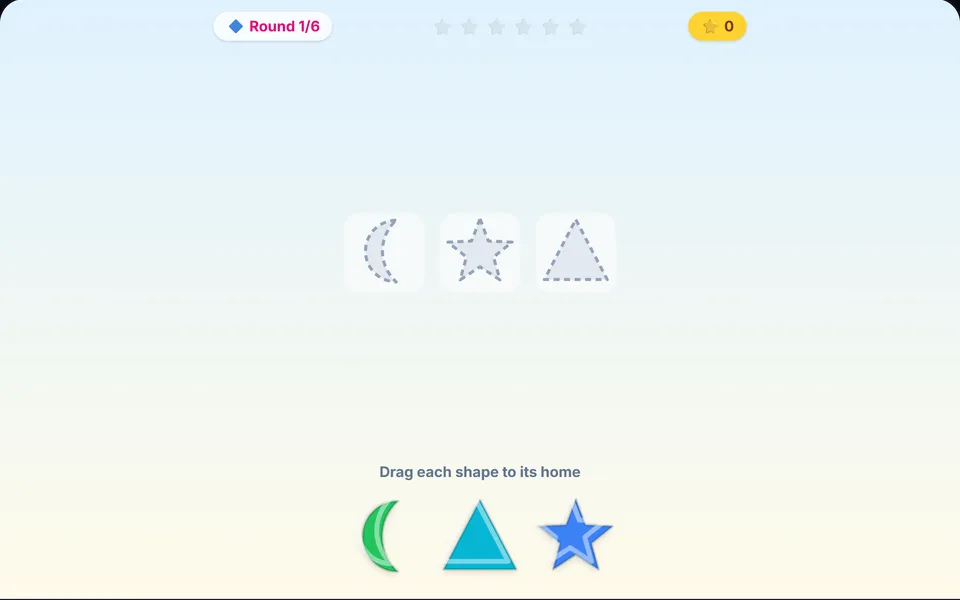
Drop every shape into its home.
About Shape Match
Drag circles, stars, hearts and more into the matching holes. Each round adds new shapes and colours, with cheerful sounds and no time limit. Perfect for little hands.
Controls
- ▸Drag a shape onto the matching outline
- ▸P or Esc to pause
- Difficulty
- ★★★★★
- Session
- ~3 min
- Plays
- 0
- Time played
- 0 min
How to play Shape Match
Brightly coloured shapes sit in a tray at the bottom, and grey dashed outlines wait above. Your child drags each shape onto the outline with the same shape and lets go. The right home makes the shape pop into place with a cheerful sound. A wrong one makes the outline wiggle, and the shape slides back to the tray to try again.
There are eight shapes: circle, square, triangle, star, heart, hexagon, diamond and moon. Round one has three and each round adds one, so round six uses all eight. There's no timer and no way to lose, and after six rounds a celebration screen marks the finish.
Tips
- ▸Say each shape's name as your child picks it up. Nothing is labelled on screen, so this is where the new words come in.
- ▸The outlines are all grey, so matching is by shape alone. Point out corners and curves to tell the hexagon from the circle, or the diamond from the square.
- ▸Drop each shape near the middle of its outline: it only snaps in when it lands close to the centre.
Shape Match FAQ
- Who is Shape Match for?
- Toddlers and preschoolers who are learning shape names and practising dragging. With no timer and no losing, it works well with a parent alongside.
- What happens if my child picks the wrong outline?
- The outline gives a little wiggle and the shape goes back to the tray. There's no penalty, so your child can keep trying until it fits.
- Does it work on a tablet?
- Yes. It's built for touch, so your child drags with a finger. On a computer a mouse works the same way.