Colouring Games for Kids🎨Color Splash
Colouring book that comes alive.
About Color Splash
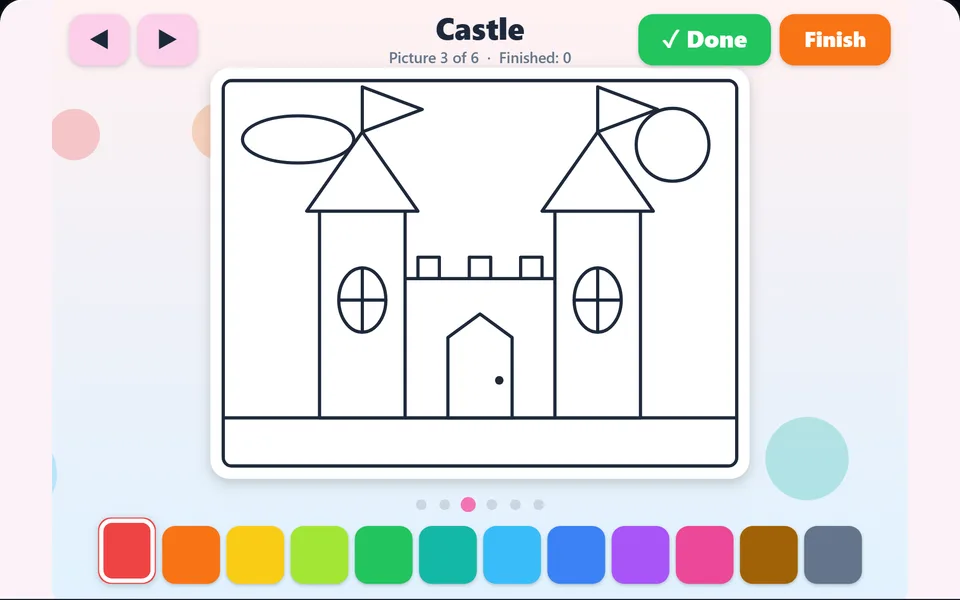
Pick a colour and tap to fill the parts of friendly pictures: a rocket, a dinosaur, a castle and more. No wrong answers, just happy colours. Tap Done when a picture is finished and pick the next one.
Controls
- ▸Tap a colour, then tap a part of the picture
- ▸Arrow keys switch pictures
- ▸P or Esc to pause
- Difficulty
- ★★★★★
- Session
- ~5 min
- Plays
- 0
- Time played
- 0 min
How to play Color Splash
Color Splash is a simple online colouring book. Your child picks one of twelve colours at the bottom, then taps any part of the picture to fill it. There are six pictures: a rocket, a dinosaur, a castle, a fish, a car and a flower. Tapping a part again with another colour changes it, so nothing can go wrong.
Use the arrow buttons at the top, or the Left and Right keys, to switch pictures; colours already added stay in place. When a picture is finished, press Done (or Enter) to see it sparkle, and the next unfinished picture appears. Press Finish to stop, or colour all six. The score is the number of pictures finished.
Tips
- ▸The background is part of the picture too. Tap the sky or the ground to give the whole scene some colour.
- ▸Small parts such as windows and wheels sit on top of bigger shapes, so tap near their middle.
- ▸Talk about colours as you go, or let your child try something silly like a purple fish.
- ▸Press Done only when your child is happy with a picture. You can go back to it later, but it only adds to the score the first time.
Color Splash FAQ
- Is Color Splash suitable for toddlers?
- It is made for young children, with big colour buttons, large shapes and no wrong answers. A grown-up may need to help with Done and Finish at first.
- Does my child need to read to play?
- No. Everything is done by tapping colours and pictures. The only words are the picture names and the Done and Finish buttons.
- Can we use it on a tablet?
- Yes. It works with a finger on phones and tablets as well as with a mouse, and it runs in the browser with nothing to install.