Card Games vs Computer🂡Wild Cards
Match colours, play wilds, shout last card!
About Wild Cards
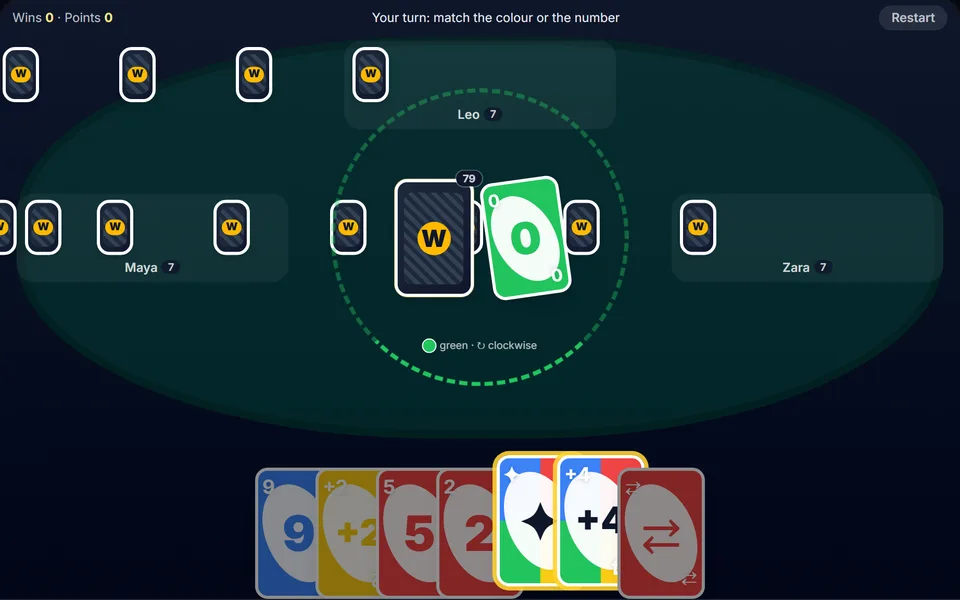
Shed all your cards by matching colour or number. Skips, reverses, draw-twos and wild cards keep every hand unpredictable. Play against three computer opponents.
Controls
- ▸Tap a playable card
- ▸Tap the deck or press D to draw
- ▸Choose a colour after a wild
- ▸Space or Enter to call last card or pass
- ▸P or Esc to pause
- Difficulty
- ★★★★★
- Session
- ~6 min
- Plays
- 0
- Time played
- 0 min
How to play Wild Cards
You play three computer opponents, Maya, Leo and Zara, and everyone starts with seven cards. On your turn, play a card that matches the top card's colour, number or symbol. Skip, Reverse and Draw Two do what they say, and a Wild lets you choose the next colour; a Wild +4 also makes the next player draw four. Can't play? Tap the deck to draw.
Draw penalties stack: answer a Draw Two with another Draw Two, or any penalty with a Wild +4. With one card left, press LAST CARD! within three seconds or you draw two. The first player out of cards wins the round and scores the cards left in other hands: face value for numbers, 20 for action cards and 50 for wilds.
Tips
- ▸Keep a Wild +4 for defence. It's the only card that can answer any draw penalty, so you pass the pile on instead of picking it up.
- ▸After a wild, choose the colour you hold the most of, so you have follow-up plays.
- ▸The computer players prefer to save action cards and wilds for when the next player is down to two cards or fewer. Close to going out? Expect a Skip or a draw card aimed at you.
Wild Cards FAQ
- Can I play Wild Cards with friends?
- No, Wild Cards is single player. You always play against three computer opponents.
- Can I play a card I've just drawn?
- Yes, if it matches. Play it straight away or choose Keep it & pass. If it can't be played, your turn passes automatically.
- Are there keyboard shortcuts?
- Yes. D draws a card, Space or Enter calls last card or passes, and Escape cancels a wild before you pick its colour.